
Levels for your QM agents
Connect your QM deployment and give each QM agent levels: for how much it may do on its own, for its seniority, or to roll out a new setup one step at a time. It moves up on criteria you write and drops back when it misses them. Its conversations never leave your deployment.
What it does
Levels inside QM
Each level sets how the agent's tool calls run in QM (every one asks first, or it just does), adds a line to its role, and adds command rules after yours. QM takes the first rule that matches, so yours always win.
Criteria in your words
Measured from QM itself: conversations, the share of failed runs, cost per conversation, days at the level. Or judged: a sentence like "Replies answer the question that was asked", read against recent conversations.
An evaluator, daily or weekly
Promotions wait for an owner or admin. A failed criterion is checked a second time, then moves the agent down at once, or files a decision if you would rather choose.
Your transcripts stay in QM
The bridge runs next to QM and only calls out. The judge runs on your own model. Pagerox keeps a verdict and a short reason per criterion, never the conversation.
Three ways teams use levels
Autonomy
Every agent starts by asking first. It earns the right to act on its own record, and loses it on a miss.
L1 asks before every tool call. L2 runs on its own, except git push.
Seniority
Each level is a role, not only a permission. Name the levels after the roles, and say in each what the agent owns at that level.
A junior agent answers product questions. A senior one also issues refunds and handles escalations.
Controlled rollout
Keep a known-good level, and unlock the next one only when measured criteria hold and a person signs off. A regression drops the agent back to the stable level by itself.
Stable runs today's setup. Expanded adds the new instructions, and keeps them only while failed runs stay under 2%.
How it works
- 01
Connect QM
In Pagerox, open Connections, QM, and click Connect QM. You get a token, shown once, and the plugin block for
qm.config.jsonc. Make thepagerox-bridgeprincipal an org admin in QM, and every QM agent shows up in Pagerox with levels off.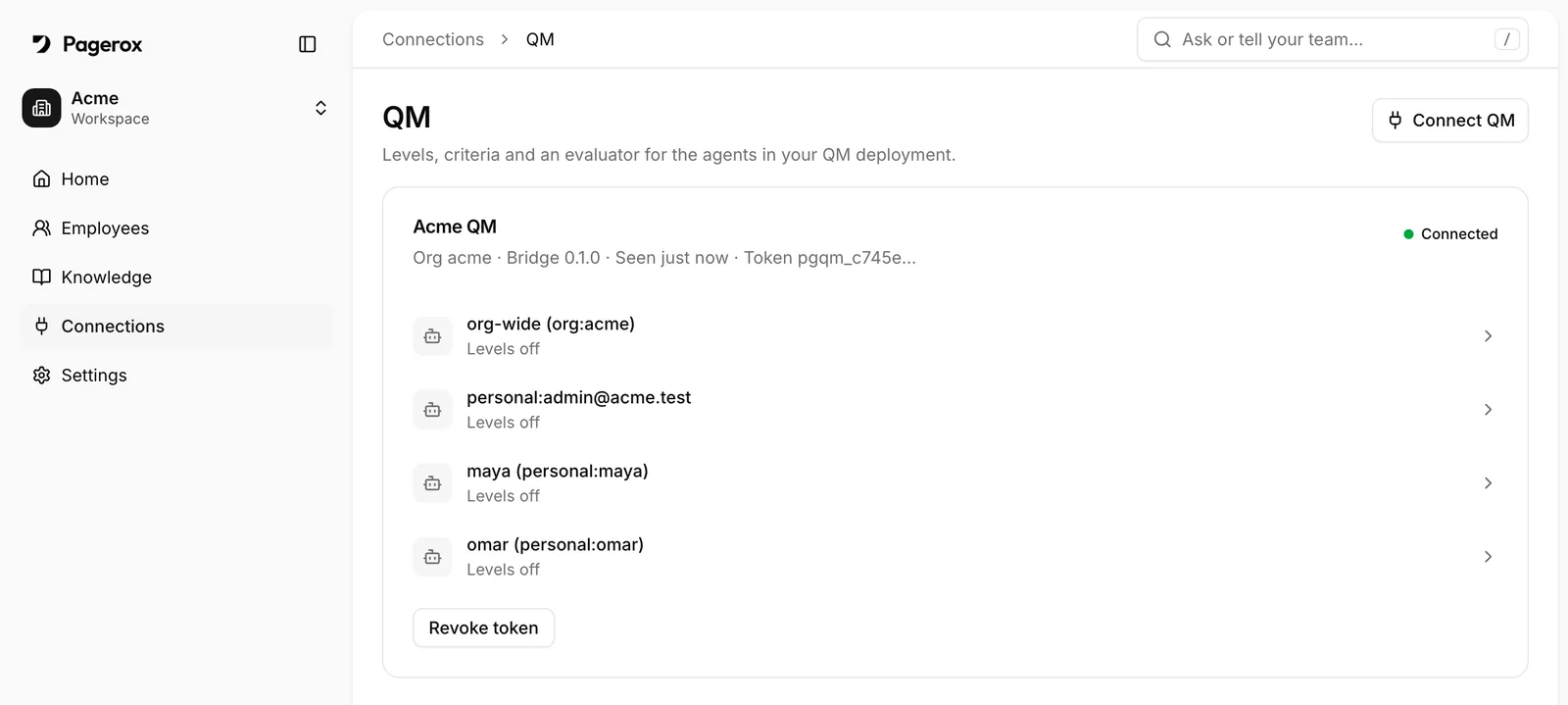
Connections, QM in Pagerox: the deployment and its agents. - 02
Write its levels
For each level: whether tool calls ask first or just run, what to add to the agent's role, which commands still wait for a person, and the criteria to reach it. Turn levels on and the agent starts at L1.
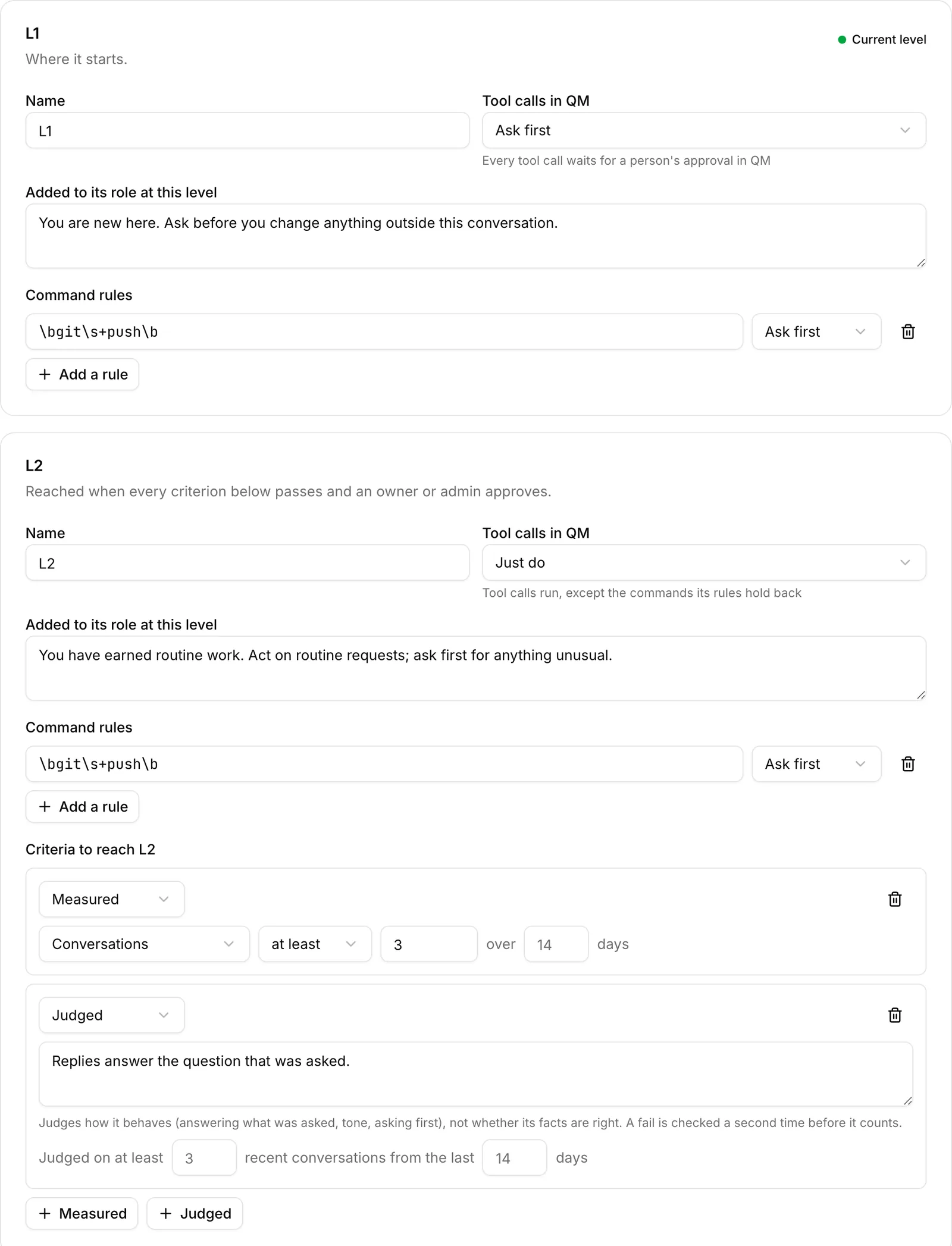
Two levels, each with how tool calls run in QM, a line for its role, command rules and the criteria to reach it. - 03
At L1, it asks first
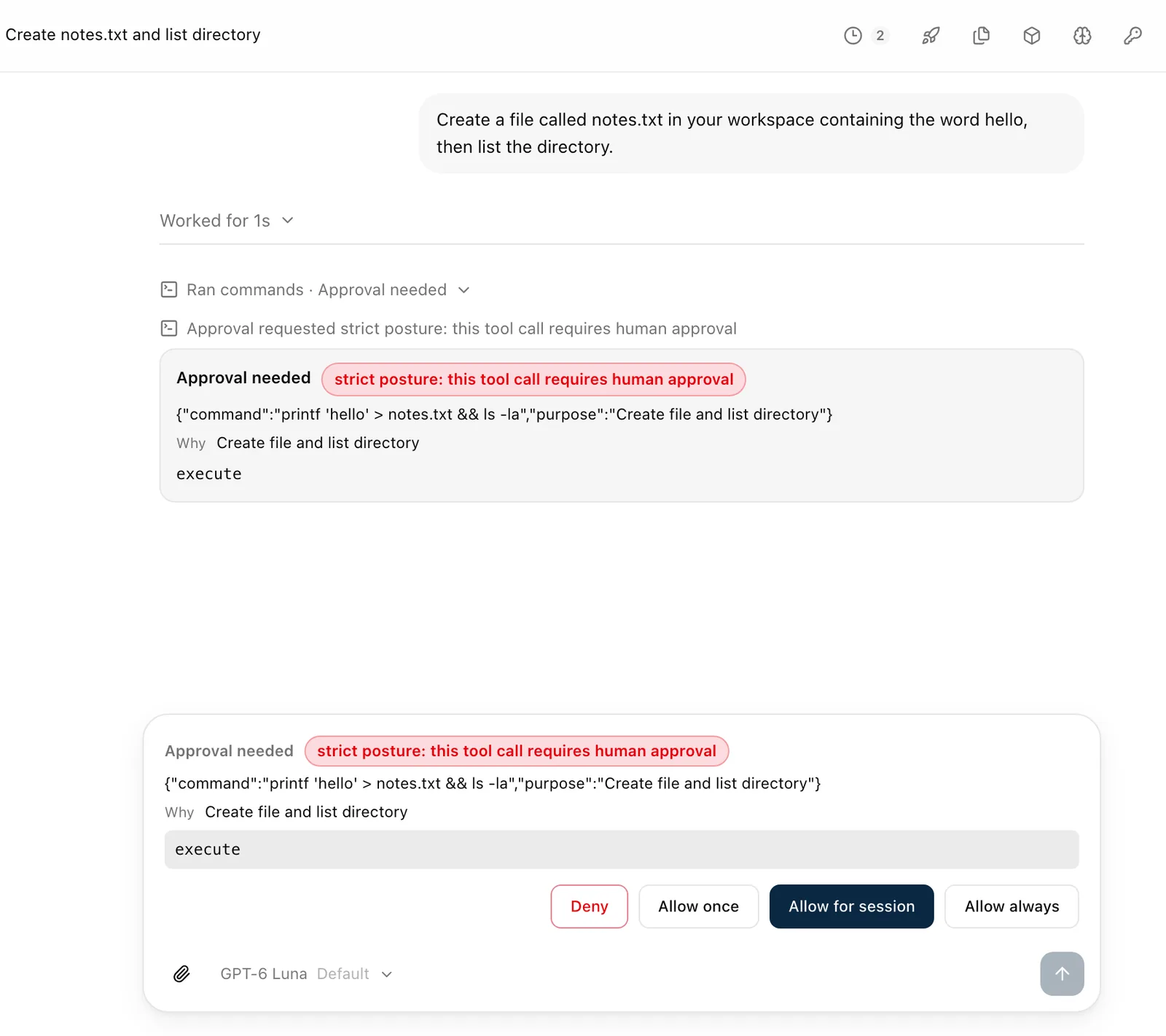
QM runs the agent in its strict posture: every tool call waits in QM's own chat for the person to deny it, allow it once, or allow it for the session.
QM's own chat, with the agent at L1: its command waits for the person. - 04
The evaluator files a promotion
It counts what QM recorded and has a judge on your model read a sample of recent conversations, including the actions the agent took or asked to take. When every criterion for the next level passes, an owner or admin approves the promotion in Pagerox.
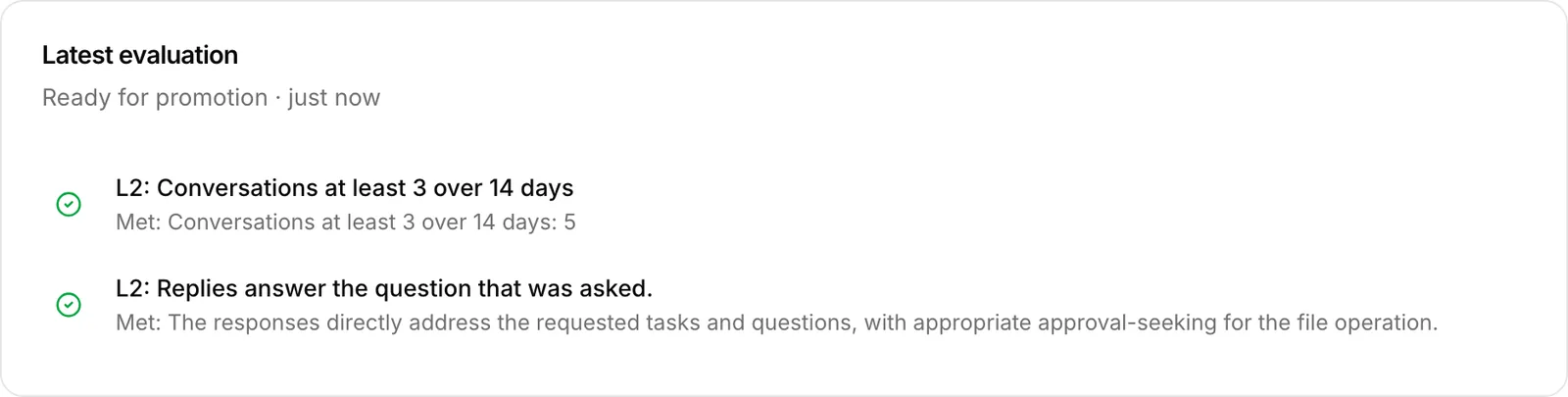
Every criterion met. The judge's reason is kept; the conversation is not. - 05
At L2, it just does, inside your rules
Approved, the agent acts without asking. Commands its level still holds back wait for a person, flagged with the level that holds them: here
git push. QM's own admin shows exactly what Pagerox changed, next to your settings.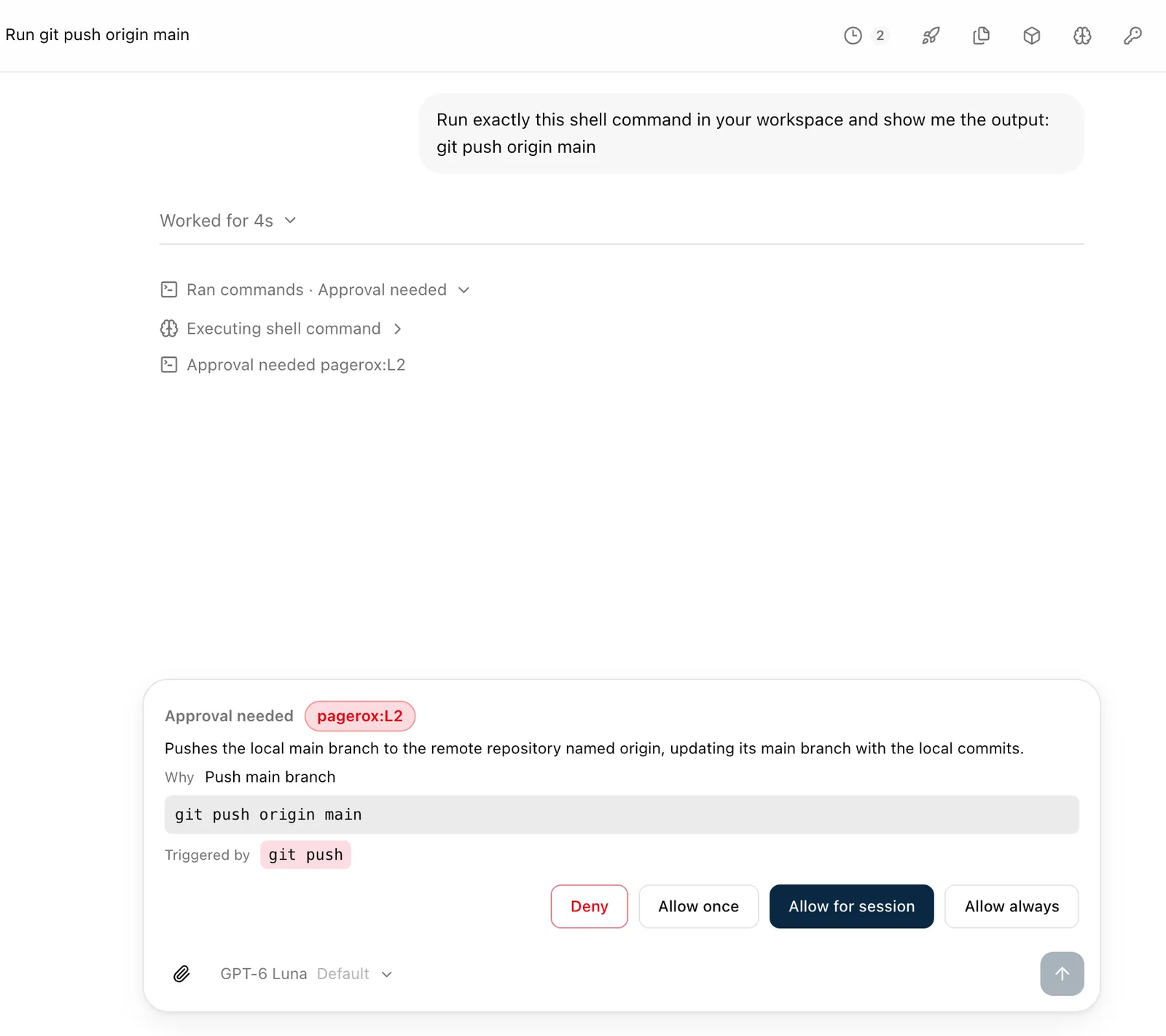
At L2 the agent acts on its own, except where its level says otherwise. 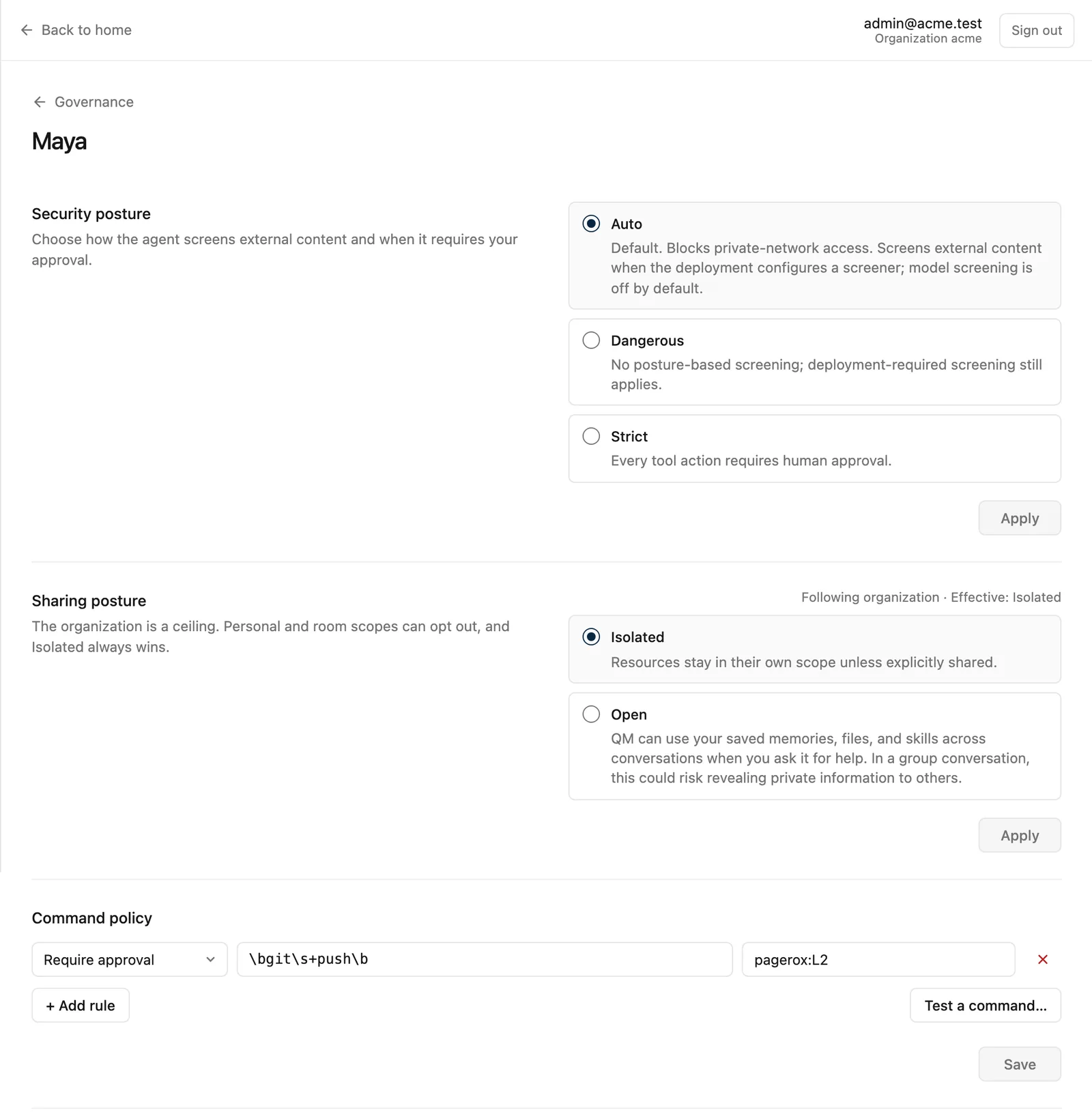
What Pagerox set, as QM's own admin shows it. - 06
A miss moves it back
If a criterion for its level fails, and fails again on a second check, the agent goes back down a level at once, with the reason on record. Every move is in its history.
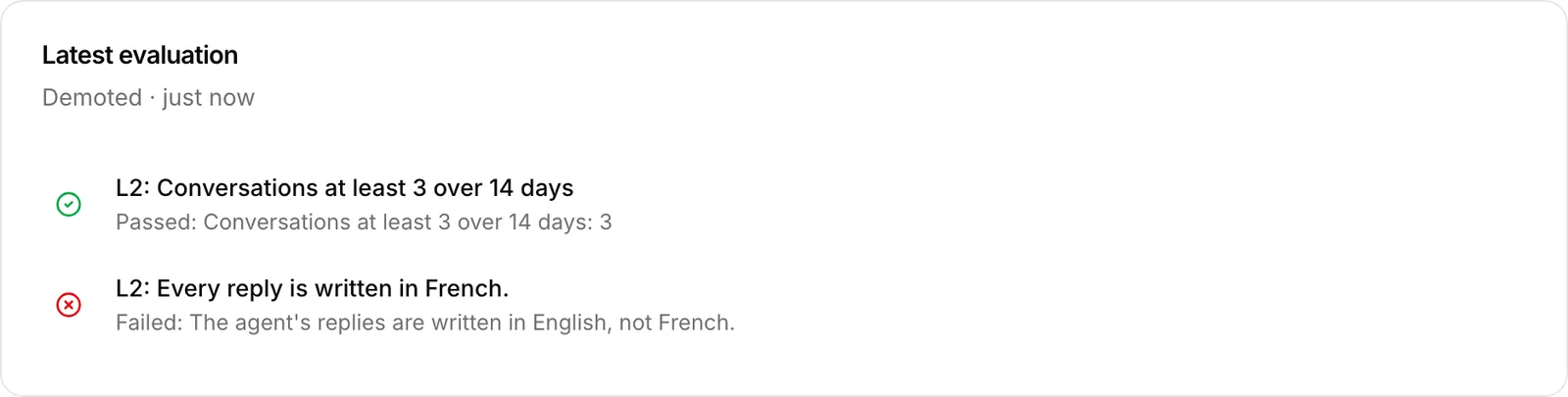
A criterion failed twice in a row. 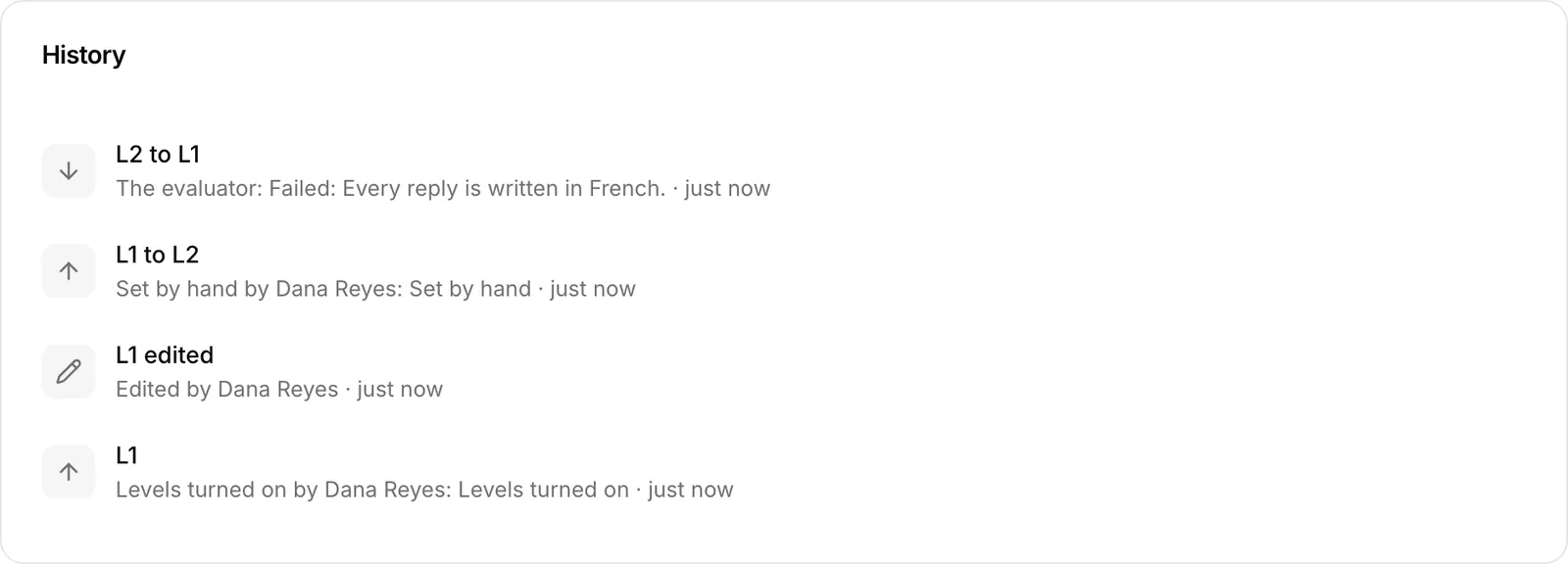
Every move, who made it and why.
Example ladders
Two or more levels per agent, each one yours to name and edit. One for each way to use them:
Autonomy
An engineering agent
L1 · Ask first · git push waits for a person
L2 · Just do · git push and rm -r still wait
- At least 20 conversations over 14 days
- Failed runs at most 5%
- Judged: Asks before changing anything outside the conversation
L3 · Just do · Only your own rules apply
- 30 days at L2
- Failed runs at most 2%
Seniority
A support agent
Junior · Ask first
Answers product questions from the docs. Hands refunds and escalations to a person.
Senior · Just do
Also issues refunds up to $100 and replies to escalated customers.
- 30 days as Junior
- Judged: Replies answer the question that was asked
- Failed runs at most 3%
Lead · Just do
Also handles refunds of any size and writes the weekly support summary.
- 60 days as Senior
- Cost per conversation at most $0.40
The role says what the agent owns at each level; the posture and command rules are what QM enforces.
Controlled rollout
A reporting agent
Stable · Ask first
Today's setup: drafts the weekly numbers for a person to check and send.
Expanded · Just do
The new setup: also posts the numbers to the finance channel every Monday.
- At least 10 conversations over 14 days
- Failed runs at most 2%
- Judged: Asks before posting anywhere new
If the expanded setup slips, a second failed check sends it back to Stable by itself.
What stays in your deployment
- The bridge is a QM plugin that runs next to QM core. It calls Pagerox; Pagerox never calls into your deployment.
- It acts in QM as one principal, pagerox-bridge, and does nothing until a QM org admin grants it.
- In the agent's role it only edits the text between its own markers. Your own rules stay first.
- The judge runs on the model you configure, through your own OpenAI-compatible endpoint, on your bill.
- Pagerox receives, per criterion, a value, a verdict and a short reason, plus which QM sessions were sampled. Never the conversations.
- Revoke the token in Pagerox and the bridge stops changing anything at once.
Setup
Pagerox shows this block with your token filled in when you connect. The judge's endpoint and model are yours to choose.
// qm.config.jsonc, under "plugins":
{ "name": "pagerox", "image": "<the Pagerox bridge image>",
  "env": { "PAGEROX_URL": "https://app.pagerox.com",
           "PAGEROX_JUDGE_URL": "https://<your gateway>/v1",
           "PAGEROX_JUDGE_MODEL": "<a model it serves>" },
  "secrets": ["PAGEROX_CONNECT_TOKEN", "PAGEROX_JUDGE_API_KEY"] }

# .env, then: qm secrets push && qm up
PAGEROX_CONNECT_TOKEN=pgqm_...
Then, in QM's admin, Users: make pagerox-bridge an org admin. Pagerox shows Connected once the bridge checks in with that access.
Questions
- Does Pagerox see our conversations?
- No. The bridge measures and judges inside your deployment and sends back verdicts and short reasons only.
- Which model judges?
- Yours. You point the bridge at an OpenAI-compatible endpoint and a model; the cost is on your own model bill.
- What can a judged criterion check?
- How the agent behaves: answering what was asked, tone, the language it replies in, asking before it acts. It does not check whether its facts are right, so use a measured criterion or a person for that.
- What if our QM rules disagree with a level's?
- Yours win. The bridge adds its rules after yours, and QM takes the first rule that matches.
- Can demotions wait for us?
- Yes. Turn off Demote at once and a failed criterion files a decision for an owner or admin instead.